
Our Latest News


Google Gemini Unveils Notebooks: Revolutionizing How You Organize Projects
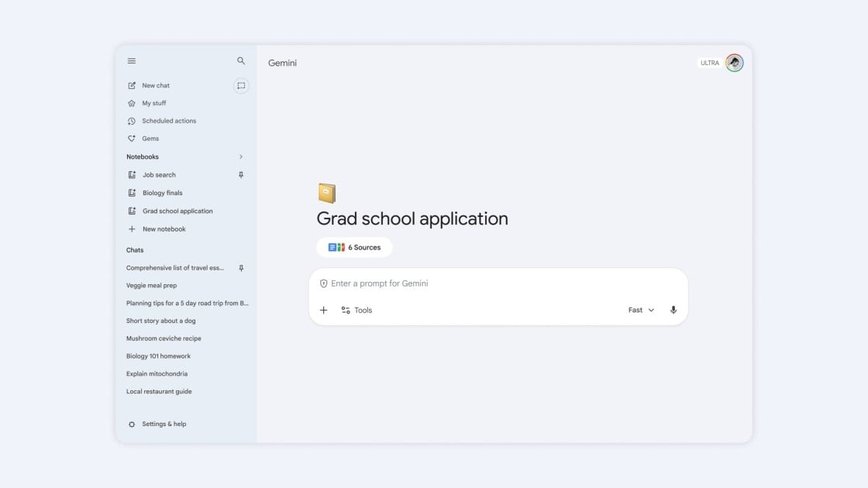
Google Gemini's Latest Innovation: Meet the Notebooks
Google Gemini is shaking things up with the launch of its new feature, notebooks. These dedicated spaces are designed to streamline your workflow by organizing files, conversations, and research into single, cohesive projects. Think of them as your personal knowledge bases, seamlessly integrated into all of Google's products.
Adding a new notebook within Gemini is straightforward. The option pops up in the side panel, prompting you to name your notebook. From there, you can tap into the Add sources feature to start crafting your knowledge base. It allows you to gather relevant files from your computer or Google Drive and link out to websites that bolster your research.
Effortless Integration Across Platforms
Google ensures that if you add a source within the Gemini notebooks, it remains accessible through NotebookLM and vice versa. This integration means you can enjoy unique features like Video Overviews and Infographics, even if your journey began on Gemini. The sync between applications promises a smooth user experience.
“This continuity means you can use the unique features of each app,” Google highlights, emphasizing the seamless transition between Gemini and NotebookLM.
Currently, this feature is available for Google AI Plus, Pro, and Ultra subscribers on the web. However, it's notably absent for those using Workspace or Education accounts, as well as users under 18. This restriction comes as a surprise, especially given Google's marketing focus on the educational benefits of notebooks for studying and exam preparation.
Looking Ahead: What’s Next for Google Gemini?
Google has revealed plans to roll out the notebook feature to its free users in the coming weeks, along with an anticipated mobile version of Gemini. The expansion reflects a commitment to making these organizational tools accessible to a broader audience.
Leading the charge in digital organization, Google Gemini’s introduction of notebooks sets the stage for innovative ways to manage knowledge. As they prepare to launch this feature across more platforms and devices, users can expect even greater flexibility and functionality in their personal project management.
Meanwhile, stay tuned as competition heats up with ChatGPT's similar organizational feature, Projects, which also offers a streamlined space to store files and conversations, ensuring you never lose track of your critical information.
Categories:

Author: Cole