
Our Latest News


Take Charge Of Your Feed: Instagram'S New Sensitive Content Controls
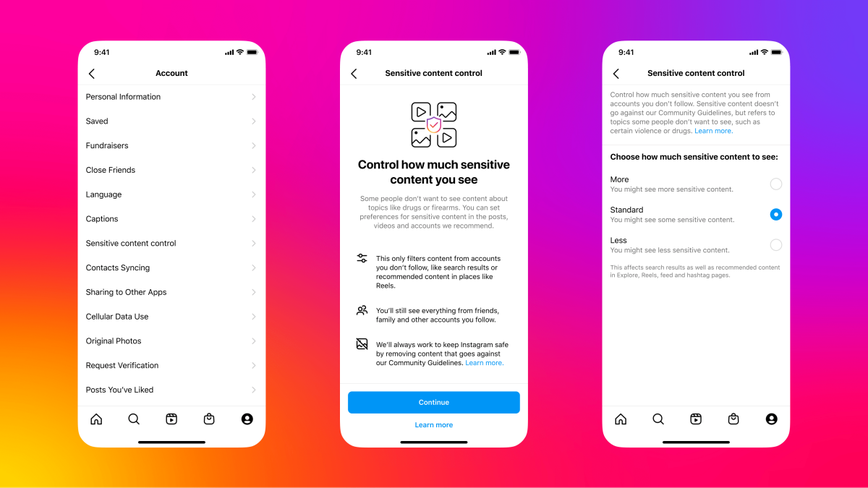
Shape Your Instagram Experience
Instagram is stepping up its game, giving users more control over what they see on the platform. A fresh feature now allows users to filter out content that might be upsetting or offensive, broadening the scope of its previously introduced "Sensitive Content Control." Initially launched last fall, this control let users decide how much sensitive material appeared on their Explore page. The new update extends that capability to include Reels, searches, suggested accounts, and hashtag pages.
The app’s help center clarifies that Sensitive Content Control is designed to manage content that doesn’t break Instagram’s Community Guidelines but might still be unsettling for some users. This could range from depictions of violence and sexually suggestive imagery to content promoting certain regulated products like tobacco or pharmaceuticals. Instagram remains committed to removing any content involving graphic violence, adult nudity, or attempts to sell most regulated goods.

Filter Options at Your Fingertips
Instagram's latest setting offers three levels of control: "More," "Less," or "Standard," the latter being the default for all users. To tweak these settings, simply head to your profile page, open the account settings, and navigate to "Sensitive content control." Here, you can decide just how much sensitive content you wish to allow in your feed. Note that users under 18 may have some restrictions on these options.
"We want users to feel empowered and comfortable with their Instagram experience," the platform's rep said, emphasizing the importance of user choice in content visibility.
If this option hasn't appeared on your account yet, don't fret. Instagram is gradually rolling it out to all users, so it should be available to you soon.
Master Your Feed
Adjusting your feed's sensitivity settings is simple. First, tap your profile picture at the bottom of the screen to access your profile page. From there, click the three horizontal lines at the top-right to open your account settings. Tap "Account," select "Sensitive content control," and choose your desired level of filtering. Finally, confirm your selection to tailor the content that appears in your feed.
With these new controls, Instagram is making it easier than ever to manage what pops up on your screen – whether you're looking to see more or less sensitive material. It's just one more way the platform is striving to offer a user-friendly and personalized experience.
Categories:

Author: Imani